Mouse
Logitech Superstrike
Symmetrical, wireless, lightweight.
Counter-Strike 2 · Config
Everything I currently run on stream — gear, PC, mouse, monitor, video settings, crosshair and more. No more asking in chat: every value is listed here, and every value copies with a single click.
Peripherals
What's actually on my desk. Links will follow once the affiliate side is sorted.
Symmetrical, wireless, lightweight.
Favourite part of the whole setup.
Daidai Orange · XL · Extra Soft
Closed-back gaming headset with ANC.
26.5″ W-OLED · 480 Hz · 1440p
Dynamic broadcast mic, cardioid.
Runs the mic, stream audio and pads.
4K webcam with AI tracking and auto-framing.
Hardware
The machine behind the stream.
In-Game
eDPI = DPI × sensitivity. In my case 1600 × 0.6 = 960.
6/11 is the 1:1 Windows step — no scaling, no added smoothing. 4000 Hz polling eats CPU headroom; if your machine struggles, drop to 1000 Hz. Your aim won't notice.
Lofree Hyzen
Per-key actuation. Movement keys sit as shallow as the board allows so counter-strafes register instantly; everything else stays deep enough that I don't fire a round by resting a finger on it.
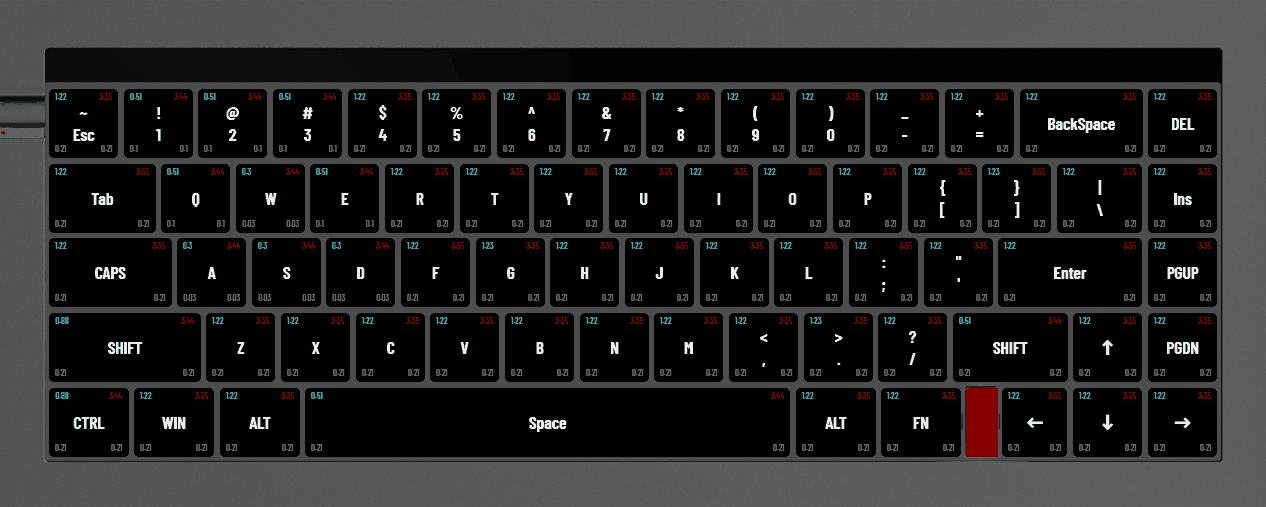
Binds
Display
Stretched 5:4 on the 27″ OLED, running the full 480 Hz.
Performance
Everything on the floor that buys frames. Anti-aliasing and 16× filtering stay on so edges and distant models still read cleanly.
Read straight out of my cs2_video.txt — the raw file is down in Config Files if you'd rather drop mine in than click through the menu.
Sharecode
Copy the code, then paste it in CS2 under Settings → Crosshair → Share or Import.
CS4ivAKMKLRRyv5USC5vxqK5pdaG7mReYwXHvF2ehMt3WK
Console
Left-handed, pulled right and low so the gun stays out of the sightline.
viewmodel_fov 68;viewmodel_offset_x 2.5;viewmodel_offset_y 0;viewmodel_offset_z -1.5;cl_prefer_lefthanded true
Interface
Pushed all the way out to the screen edges — more room in the middle, less to scan.
hud_scaling 1;cl_hud_color 12;cl_showloadout true;safezonex 1;safezoney 1
HUD
Zoomed out and scaled up, so most of the map stays readable without squinting. Caps Lock toggles between this and the close-up scale.
cl_hud_radar_scale 1.15;cl_radar_scale 0.4;cl_radar_rotate true;cl_radar_icon_scale_min 0.6
Acezone A-Spire
The headset's own CS2 profile, with the channels pulled far apart — left and right stay distinct enough that steps place themselves before you turn.
Driver
I don't touch the NVIDIA Control Panel. Everything driver-side runs through NVIDIA Profile Inspector, set up from BiNoX's guide. His profile is below — import it and you have the same thing I run.
Credit where it's due: the profile is BiNoX's work, not mine. Grab Profile Inspector, open binox.nip with the folder icon, hit Apply Changes, reboot.
Steam
Nothing in the box. CS2 picks the right settings on its own these days, and most of the old CS:GO launch flags do nothing or actively cost frames.
Raw download
Everything on this page as the actual files. The CS2 configs go into …\Steam\userdata\<your ID>\730\local\cfg\ — close the game first, then drop them in.
My whole cfg folder — video config, convars, crosshair and keybinds in one go.
DownloadVideo settings only — resolution, refresh rate and every advanced video option.
DownloadBiNoX's NVIDIA Profile Inspector profile. Open it in Profile Inspector, apply, reboot.
DownloadThe Lofree Hyzen key map above as a full-size image, every key with its numbers.
Download"video.cfg"
{
"Version" "16"
"VendorID" "4318"
"DeviceID" "9860"
"setting.cpu_level" "3"
"setting.gpu_mem_level" "3"
"setting.gpu_level" "3"
"setting.knowndevice" "0"
"setting.defaultres" "1280"
"setting.defaultresheight" "1024"
"setting.refreshrate_numerator" "479989"
"setting.refreshrate_denominator" "1000"
"setting.fullscreen" "1"
"setting.coop_fullscreen" "0"
"setting.nowindowborder" "1"
"setting.mat_vsync" "0"
"setting.fullscreen_min_on_focus_loss" "1"
"setting.high_dpi" "0"
"Autoconfig" "2"
"setting.shaderquality" "0"
"setting.r_texturefilteringquality" "5"
"setting.msaa_samples" "2"
"setting.r_csgo_cmaa_enable" "0"
"setting.videocfg_shadow_quality" "0"
"setting.videocfg_dynamic_shadows" "1"
"setting.videocfg_texture_detail" "0"
"setting.videocfg_particle_detail" "0"
"setting.videocfg_ao_detail" "0"
"setting.videocfg_hdr_detail" "-1"
"setting.videocfg_fsr_detail" "0"
"setting.monitor_index" "0"
"setting.r_low_latency" "2"
"setting.aspectratiomode" "0"
}
Back up your own files first. The resolution and refresh rate in here are built for a 480 Hz panel — on a different monitor set those two in the menu afterwards, everything else carries over fine.
No settings found.
Community
Socials
Stream runs on Twitch, clips and shorts go everywhere else.